IT Consultancy
IT Consultancy Get expert guidance to leverage technology for your business growth. We help you identify the right IT solutions, optimize infrastructure, and ensure your digital environment is secure,…

make IT easy


IT Consultancy Get expert guidance to leverage technology for your business growth. We help you identify the right IT solutions, optimize infrastructure, and ensure your digital environment is secure,…
Digital Marketing Grow your brand and reach the right audience with data-driven marketing strategies. We help you create campaigns that convert, manage social channels effectively, and optimize your d…
Privacy Policy At CometSoul, accessible from https://cometsoul.com, one of our main priorities is the privacy of our visitors. This Privacy Policy document contains types of information that is collec…
Welcome to CometSoul! These terms and conditions outline the rules and regulations for the use of CometSoul’s Website, located at https://cometsoul.com. By accessing this website we assume you a…
If you require any more information or have any questions about our site’s disclaimer, please feel free to contact us. Disclaimers for CometSoul All the information on this website – https…

Managed Wi-Fi Service Build a fast, stable, and secure Wi-Fi for your business at Zero depreciation cost. Enterprise-Grade Guest Wi-Fi With $0 Upfront Hardware Costs. We provide, install, and support …

Smart Business System Integrator Simplify your daily operations with smart systems that automate bookings, schedules, and routine tasks so you can focus on growing your business. We set up and integra…
IT Procurement & Hardware Managed Service Keep your technology running smoothly from the hardware you use every day to the systems that power your business. We provide end-to-end IT management so …
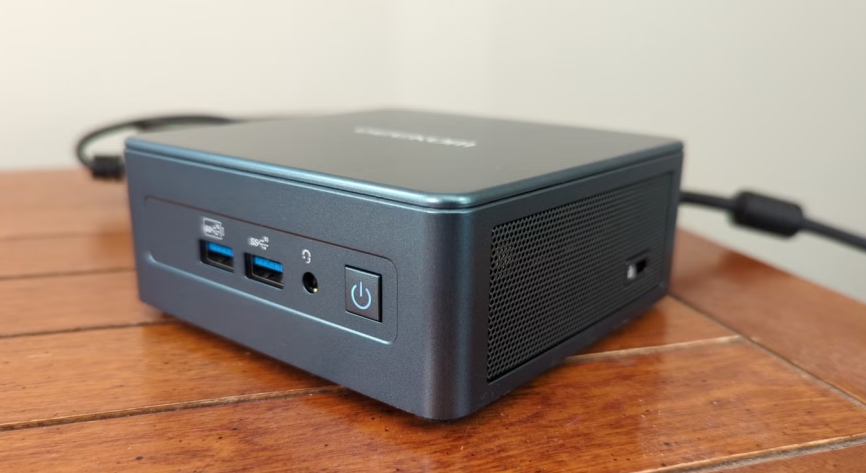
A used mini PC for home lab use is becoming more attractive for people who want to learn technology without buying a large server. It is small, usually quiet, and often powerful enough to run many home services.
Many used business mini PCs are now getting a second life. Devices such as Lenovo ThinkCentre Tiny, Dell OptiPlex Micro, HP EliteDesk Mini, Intel NUC, and similar systems often come with x86 processors, upgradeable RAM, SSD storage, and built in Ethernet.
At the same time, the self hosting trend is growing. More people want control over their files, photos, media, smart home devices, automation, and small AI experiments. This is where a used mini PC becomes more than old hardware. It becomes a small learning platform for servers, networking, virtualization, and digital privacy.
A used mini PC works well for a home lab because it gives a good balance between cost, size, and performance. You do not always need a rack server with loud fans and high power draw to start learning server technology. A home lab is usually a place to experiment. You can try Linux servers, virtual machines, containers, firewalls, monitoring tools, private cloud platforms, and backup systems. Many of these workloads can run on a modest used mini PC. For example, a mini PC with an older Intel Core i3 or Core i5 processor, 16 GB of RAM, and a 256 GB SSD can already handle many light tasks. If you upgrade the RAM to 32 GB, you get more room for virtual machines, containers, databases, and monitoring tools. However, a mini PC still has limits. Internal storage is usually limited. Cooling is smaller than a desktop tower. Expansion slots are also minimal. Because of that, a used mini PC is best treated as a compact compute node, not as a large storage server with many hard drives.
One of the best uses of a used mini PC for home lab learning is virtualization. With Proxmox VE, for example, you can run virtual machines and Linux Containers from a web based interface. Virtualization allows one small machine to act like several small servers. One virtual machine can run a Linux server. Another can run a Windows test system. A container can run a lightweight dashboard, reverse proxy, DNS service, or monitoring stack. This is useful for beginners because it teaches real server concepts. You can learn how to create virtual machines, assign CPU and RAM, manage storage, create snapshots, restore backups, and build virtual networks. It also gives you a safer space to make mistakes. If a configuration breaks, you can delete the virtual machine or restore a snapshot. You do not need to risk your main computer.
A used mini PC can also become a small private cloud. One popular option is Nextcloud. It can be used to store files, sync documents, share folders, manage contacts, use calendars, and access personal data from different devices. This is useful because not every file needs to live in a public cloud account. Personal documents, family archives, work notes, and photo backups can be stored on hardware you control. However, security matters. If you expose your private cloud to the internet, you need to be careful. Use strong passwords, HTTPS, regular updates, limited access, and proper backup routines. For many home users, a safer approach is to access the private cloud through a VPN such as WireGuard or Tailscale. This way, the service does not need to be directly visible to the public internet.
If you have a collection of movies, family videos, music, or recorded content, a used mini PC can work as a media server. Tools like Jellyfin or Plex can organize your media library and stream it to a TV, laptop, tablet, or phone. Intel based mini PCs are often interesting for this use because many models support Intel Quick Sync. This can help with video transcoding and reduce CPU load when the server needs to convert video for playback. Still, the experience depends on the hardware. Streaming 1080p content is usually lighter. Transcoding 4K video, burning subtitles, or serving multiple users at once can demand more power. For personal use at home, many used mini PCs are good enough. The key is to avoid unnecessary transcoding when possible and use media formats that your devices can play directly.
A used mini PC can also run Home Assistant. This is useful if you want to control smart lights, sensors, cameras, switches, air conditioners, and other connected devices from one place. Home Assistant supports installation on x86 64 machines, including Intel NUC style systems and similar mini PCs. Compared with some smaller single board computers, a mini PC often gives more CPU power, more RAM, and better storage options. This can make a difference when your smart home grows. More devices, more automations, more dashboards, and more integrations can all add load over time. A local smart home server also gives you more control. Some automations can continue to run inside your home network. They do not always need to depend on a vendor cloud service.
A used mini PC can become a light NAS, but it should be used with realistic expectations. Most mini PCs do not have space for many internal hard drives. Because of this, they are better for simple file sharing, small backups, or SSD based storage. OpenMediaVault is one option for building a small file server. It supports common services such as SMB, FTP, rsync, and other storage related features. You can use the internal SSD, an external USB hard drive, or a small direct attached storage device. This can be enough for documents, photos, project files, and basic home backups. However, if you want many hard drives, serious RAID, or tens of terabytes of storage, a dedicated NAS or larger server case is a better choice. A mini PC is compact and efficient, but it is not designed to replace every kind of storage system.
A home lab is not only about running apps. A used mini PC can also help you learn networking and cybersecurity in a safe environment. You can build a small lab for firewall testing, VLAN practice, VPN access, DNS filtering, log monitoring, and SIEM experiments. One virtual machine can act as a Linux server. Another can act as a test client. A third can run monitoring tools. This kind of practice is hard to understand from theory alone. When you run your own lab, you can see how traffic moves, how logs appear, and how firewall rules change access between systems. However, cybersecurity testing must stay inside your own environment. Do not test public systems or other people’s networks without permission. A home lab is valuable because it gives you a legal and safe place to learn.
The current AI trend also makes a used mini PC more useful. It is not the best device for large AI models, but it can still be used for small experiments. You can use it to learn Python, run automation scripts, test small local models, host a simple chatbot, or connect workflows to external AI APIs. If the mini PC has enough RAM, some lightweight local AI tools may run, although performance will not match a workstation with a strong GPU. The mini PC can also become an automation server. It can scrape data from approved sources, process files, run scheduled scripts, monitor websites, or connect different apps through tools like n8n. For people learning AI and automation, this is a practical starting point. You learn how systems connect, how data moves, and how scripts run in the background.
There is also a sustainability angle. A used mini PC that still works does not need to become electronic waste immediately. Microsoft ended Windows 10 support on October 14, 2025. Many older computers still work after that date, but they no longer receive regular security updates from Microsoft. For devices that no longer make sense as Windows desktops, a Linux based server role can be a useful second life. Installing Linux, Proxmox, or another server platform can turn old hardware into something productive again. It can save money and reduce unnecessary waste. Of course, the system still needs updates. Do not run an outdated operating system and assume it is safe. If the mini PC becomes a server, maintenance becomes part of the job.
When choosing a used mini PC, do not only look at the price. Check the processor, RAM capacity, storage type, Ethernet ports, power adapter, cooling condition, and upgrade options. For a light home lab, 16 GB of RAM is workable. However, 32 GB is much more comfortable if you want to run several virtual machines. For storage, an SSD is strongly recommended because it makes the system feel much faster. Ethernet also matters. One Ethernet port is enough for most simple servers. Two Ethernet ports are better if you want to learn routing, firewalling, or network separation.
Also check physical condition. A cheap mini PC with thermal issues or a faulty power adapter may become annoying later. A clean, stable, and slightly more expensive unit can be the better long term choice.
A used mini PC for home lab use is a smart choice for anyone who wants to learn technology by doing. It can become a virtualization host, private cloud, media server, smart home hub, light NAS, networking lab, cybersecurity playground, and small automation server.
Its real value is not only the low price. Its value is the learning opportunity. From one small box, you can understand many ideas that power modern IT systems.
If you already have a healthy used mini PC, do not rush to call it obsolete. With the right setup, it can become a personal server, a creative lab, and a practical way to keep learning new technology at home.